A Google Tasks Apple Reminders Sync Alternative for Mac
If you want to keep using both Google Tasks and Apple Reminders, ReminderBridge offers a focused Mac app for connecting selected lists without adding another task system to manage.
- Keep the Google Tasks and Apple Reminders apps you already use.
- Select which Google Tasks lists connect with Apple Reminders.
- Choose scheduled syncing or Sync Now based on your workflow.
Requires macOS 13.5 or later, one Google account, and an active internet connection.
What to evaluate in a sync alternative
A useful alternative should fit the task apps and devices you already depend on. ReminderBridge runs on your Mac, connects selected lists, and processes syncing locally without storing your task data remotely.
- Selected-list control
- Task creation and updates
- Task deletion and movement
- Local processing
- Manual and scheduled sync
A Focused Alternative for Your Existing Apps
Keep
Continue using Google Tasks for Google workflows and Apple Reminders across your Apple devices.
Choose
Select a Google Tasks or Apple Reminders list to create its connected counterpart.
Connect
Use scheduled intervals or Sync Now to keep supported task changes connected.
Choose an alternative that fits your actual workflow.
A sync alternative should solve the gap between Google Tasks and Apple Reminders without forcing you into a replacement task platform. ReminderBridge works as a Mac-based bridge for selected lists and supported task changes.
Consider what you need to sync
ReminderBridge supports task creation, updates, deletions, and movement between selected lists. Subtasks are not currently synced.
Consider how syncing runs
Syncing uses 15 to 60 minute intervals or Sync Now. It requires an active internet connection and does not use real-time push updates.
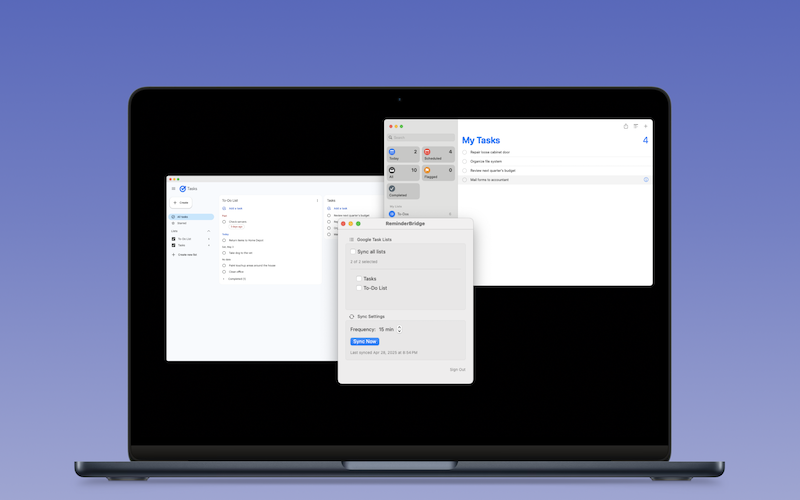
What ReminderBridge offers
Evaluate the documented capabilities and limitations before choosing your sync workflow.
Selected-list syncing
Choose which Google Tasks lists ReminderBridge includes in your Apple Reminders workflow.
Supported task changes
Connect task creation, updates, deletions, and movement between selected lists.
Local processing
ReminderBridge uses required system permissions and does not store your task data remotely.
Practical sync controls
Set a scheduled interval or use Sync Now when you want an immediate sync attempt.
Before you choose ReminderBridge
Confirm that its Mac requirements, supported changes, and sync model match what you need. For a practical comparison before choosing a sync tool, read Apple Reminders vs Google Tasks.
-
Confirm your Mac
ReminderBridge requires macOS 13.5 or later and an active internet connection.
-
Confirm your accounts
ReminderBridge currently supports one Google account and one Apple Reminders account at a time.
-
Confirm the sync model
Lists can originate in Google Tasks or Apple Reminders. Their origin cannot change after connection, and list deletion remains manual.
-
Choose your lists and interval
Select the lists you need, then use scheduled syncing or Sync Now.
Choose a sync alternative that keeps your workflow familiar.
Use ReminderBridge to connect selected Google Tasks lists with Apple Reminders on your Mac.